
Get Answers
Understanding the Need for Eye Self-Testing Tools
In today's digital age, taking care of one's eye health has become increasingly important, especially given the extended hours many individuals spend on screens. While regular visits to an eye care professional are crucial, reliable self-testing tools for the eyes can serve as a valuable resource for preliminary assessments and ongoing monitoring. However, finding trustworthy tools is essential to ensure accurate results and appropriate guidance.
Online Resources for Eye Self-Testing
There are several online platforms that offer self-testing tools for eyes. Vision Direct and Specsavers, both prominent names in the UK optical industry, offer online vision tests that can help users assess their eyesight from home. These tests are not a substitute for a professional eye examination, but they can help indicate whether an individual might need to visit an optometrist. It's important to use these tests in a well-lit environment and follow the instructions carefully for the best results.
Mobile Applications for Eye Tests
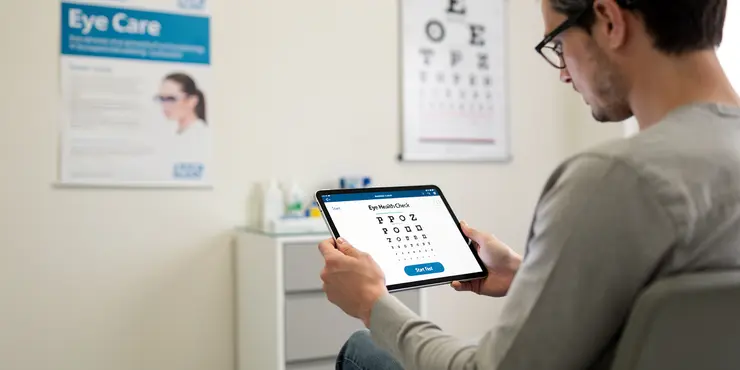
Various mobile applications are available for iOS and Android devices that provide eye testing features. Some popular applications include EyeQue and Peek Acuity, both of which are designed to facilitate vision testing at home. These apps typically utilize technology that measures vision clarity and screen contrast to offer basic assessments of eye health. Users should ensure that they are downloading these applications from reputable app stores to avoid unreliable or harmful services.
How to Ensure Accuracy and Reliability
While online and mobile tools offer convenience, they must be used correctly to provide reliable information. Following the instructions provided by the tool precisely is key. It's also beneficial to verify whether the tool or app has accreditation or approval from relevant health organizations or eye care professionals. Reading reviews and testimonials from other users can also offer insight into the tool's reliability.
Limitations and Recommendations
Though self-testing tools can provide a helpful preliminary check, they are not comprehensive. They cannot replace the expertise of an optometrist, who can conduct a full eye examination and check for conditions such as glaucoma, cataracts, and other concerns that might not be apparent through a digital interface. Therefore, individuals should use self-tests as a supplemental measure and ensure routine visits to their optometrist or ophthalmologist.
Conclusion
Reliable self-testing tools for the eyes are readily available for UK residents on reputable online platforms and mobile apps. However, while these tools offer convenience and can help monitor eye health between professional check-ups, they should not replace regular official eye examinations. For maintaining optimal eye health and updating prescriptions, visiting a professional remains a crucial step.
Why We Need Eye Self-Testing Tools
Today, we use screens a lot. This means taking care of our eyes is very important. Seeing an eye doctor is important too. But self-testing tools can help us check our eyes at home. It's important to find good tools so results are correct.
Online Tools to Test Your Eyes
You can find eye tests online. Vision Direct and Specsavers are two UK companies that offer online eye tests. These tests let you check your eyes at home. Remember, these tests are not the same as seeing an eye doctor. Use them in a bright room and follow instructions for best results.
Mobile Apps for Eye Tests
There are apps for phones and tablets that test your eyes. EyeQue and Peek Acuity are two examples. These apps help you check how well you see. Make sure you download them from trusted stores like the App Store or Google Play Store.
How to Make Sure Tests Are Right
Online and app tests are easy to use but make sure you follow the instructions. Check if the tool is approved by health experts or eye doctors. Reading what other people say about the tool can also help.
Things to Remember
Self-tests are good for a quick check but don’t replace a real doctor’s exam. Only a doctor can check for serious eye problems. Use these tests as an extra help. Always go to an eye doctor for a full check-up.
Conclusion
You can find good eye self-tests online and in apps. They are handy for checking your eyes at home. But, still visit your eye doctor regularly for the best eye care.
Frequently Asked Questions
Self-testing tools for eye health are at-home methods or devices that help you check aspects of vision or eye function, such as visual acuity, color vision, or screen for symptoms. They usually provide an estimate, not a diagnosis, and are best used to decide whether professional eye care is needed.
Self-testing tools for eye health can be useful for adults, older adults, people with diabetes, contact lens wearers, and anyone noticing vision changes. Children should use them only with adult supervision, and anyone with sudden symptoms should seek urgent care rather than rely on self-testing.
Self-testing tools for eye health can help detect reduced visual acuity, possible color vision issues, alignment concerns, dry-eye symptoms, and changes that may suggest a need for professional evaluation. They cannot reliably diagnose diseases such as glaucoma, macular degeneration, or cataracts on their own.
Self-testing tools for eye health are limited by lighting, screen quality, user error, and the fact that they cannot fully examine the eye. They may miss serious conditions or produce false reassurance, so they should not replace comprehensive eye exams.
The accuracy of self-testing tools for eye health varies by the tool, the user's skill, and testing conditions. Some digital vision tests can be reasonably useful for screening, but none are as reliable as a full exam by an eye care professional.
Self-testing tools for eye health can be used occasionally to monitor changes, especially if you have a known risk factor or ongoing symptoms. They are not a substitute for routine eye exams, and the frequency should be based on age, risk level, and a clinician's advice.
No, self-testing tools for eye health cannot replace a professional eye exam. They are screening aids that may help identify changes early, but only an eye care professional can perform a complete assessment and diagnosis.
Common self-testing tools for eye health include printed eye charts, smartphone vision apps, color vision plates, Amsler grid checks, and home tonometry devices in some cases. Availability and quality vary, and not all home tools are appropriate for every person.
Self-testing tools for eye health provide a baseline so you can compare results over time and notice changes in clarity, distortion, or near and distance vision. Tracking trends can help you decide when to schedule an eye exam sooner.
Most self-testing tools for eye health are safe when used as instructed. However, they should not delay care for sudden vision loss, eye pain, flashes, new floaters, injury, or other urgent symptoms that need immediate evaluation.
Some self-testing tools for eye health can be used for children, especially simple vision charts or age-appropriate screening apps, but supervision is important. Children who seem to squint, sit very close to screens, or have learning difficulties may need a formal eye exam.
Self-testing tools for eye health generally cannot detect glaucoma reliably because glaucoma often has no early symptoms and requires specialized testing. A professional eye exam is necessary to check eye pressure, optic nerve health, and visual fields.
Some self-testing tools for eye health, such as an Amsler grid, may help notice distortion or central vision changes associated with macular problems. However, they cannot confirm macular degeneration, so any change should be evaluated by an eye care professional.
Self-testing tools for eye health may suggest blurry or glare-related vision changes that can happen with cataracts, but they cannot diagnose cataracts. A clinician can examine the lens and determine whether cataracts are present and whether treatment is needed.
Many self-testing tools for eye health require only a smartphone, a printed chart, good lighting, and the correct testing distance. Some advanced home devices may require calibration or special accessories, so following the instructions carefully is important.
Self-testing tools for eye health should be used in a quiet, well-lit area with the correct distance from the chart or screen. You should wear the correction you normally use for distance or near tasks, follow the directions exactly, and test one eye at a time when instructed.
Yes, self-testing tools for eye health can usually be used by people with glasses or contact lenses, but the instructions may specify whether to test with or without them. For a typical screening, it is often best to test using your usual corrective lenses unless told otherwise.
If self-testing tools for eye health suggest a change or problem, you should schedule an eye exam with an optometrist or ophthalmologist. If you have sudden vision loss, eye pain, flashes, a curtain over vision, or injury, seek urgent medical care right away.
Some smartphone apps can be useful self-testing tools for eye health, but reliability varies widely. Use apps from reputable sources, and remember they are screening tools only and should not replace professional evaluation.
Choose self-testing tools for eye health that come from reputable medical, academic, or recognized health organizations and have clear instructions. Avoid tools that make unrealistic claims, and consider asking an eye care professional which screening methods are appropriate for your needs.

Ergsy Search Results
This website offers general information and is not a substitute for professional advice.
Always seek guidance from qualified professionals.
If you have any medical concerns or need urgent help, contact a healthcare professional or emergency services immediately.
Some of this content was generated with AI assistance. We've done our best to keep it accurate, helpful, and human-friendly.
- Ergsy carefully checks the information in the videos we provide here.
- Videos shown by Youtube after a video has completed, have NOT been reviewed by ERGSY.
- To view, click the arrow in centre of video.
- Most of the videos you find here will have subtitles and/or closed captions available.
- You may need to turn these on, and choose your preferred language.
- Go to the video you'd like to watch.
- If closed captions (CC) are available, settings will be visible on the bottom right of the video player.
- To turn on Captions, click settings.
- To turn off Captions, click settings again.