
Get Answers
Introduction to Ring Doorbell Camera
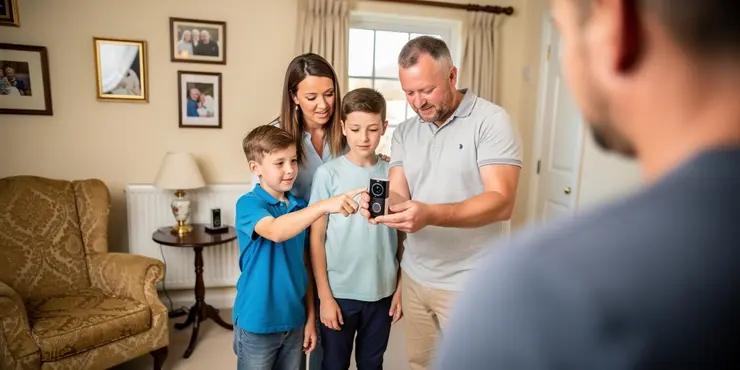
The Ring Doorbell Camera is a modern home security solution that allows residents to monitor their doorsteps and communicate with visitors from anywhere. With the rise of smart home technology, this device has gained popularity in the UK for its convenience and enhanced security features.
How the Ring Doorbell Camera Works
The Ring Doorbell Camera is a smart device that integrates with your home's Wi-Fi network to provide real-time alerts and video streaming. It is installed near your front door, replacing or complementing the traditional doorbell system. Upon pressing the doorbell button, it sends an instant alert to your smartphone, tablet, or computer through the dedicated Ring app.
Motion Detection and Alerts
One of the standout features of the Ring Doorbell Camera is its motion detection capability. This camera is equipped with motion sensors that can detect movement within a specified range. When triggered, the camera automatically starts recording and sends an alert to your connected devices. This is particularly useful for monitoring suspicious activities and ensuring the safety of your home even when you are not present.
Video Streaming and Communication
The Ring Doorbell Camera provides live video streaming, allowing you to see who is at your door in real-time. This feature is accessible via the Ring app, which can be downloaded on iOS and Android devices. Additionally, the camera includes a built-in microphone and speaker, enabling two-way communication. This means you can have a conversation with visitors or delivery personnel through your smartphone without having to open the door.
Integration with Smart Home Systems
For UK residents who have embraced smart home technology, the Ring Doorbell Camera offers seamless integration with various smart home systems. It can connect with devices such as Amazon Alexa, allowing voice control and notifications through Echo devices. This integration enhances the user experience by providing more control over the security system.
Power Options
The Ring Doorbell Camera offers flexible power options. It can be hardwired to your existing doorbell wiring, or it can operate on a rechargeable battery. This flexibility allows homeowners to choose a power solution that fits their needs, whether they prefer the hassle-free approach of a wired connection or the versatility of a battery-powered unit.
Conclusion
Overall, the Ring Doorbell Camera provides an efficient and reliable way to enhance home security in the UK. With its motion detection, live video streaming, and two-way communication features, it allows homeowners to monitor their property seamlessly. Its compatibility with various smart home devices further adds to its appeal, making it a popular choice for tech-savvy households.
Introduction to Ring Doorbell Camera
The Ring Doorbell Camera helps keep your home safe. It lets you see and talk to people at your door from anywhere. Many people in the UK like it because it is easy to use and keeps their homes more secure.
How the Ring Doorbell Camera Works
The Ring Doorbell Camera connects to your home's Wi-Fi. It sends alerts and video to your phone, tablet, or computer. It goes near your front door and can replace your old doorbell. When someone presses the button, you get a message on your device using the Ring app.
Motion Detection and Alerts
This camera can see movement. It has motion sensors that notice when something moves in front of it. When it sees movement, it starts recording and tells your devices. This helps you keep your home safe even when you are away.
Video Streaming and Communication
You can see live video of who is at your door with the Ring Doorbell Camera. You use the Ring app on your phone or tablet to watch the video. The camera has a microphone and speaker so you can talk to visitors or delivery people from your phone without opening the door.
Integration with Smart Home Systems
If you use smart home devices, the Ring Doorbell Camera can work with them. It can connect to devices like Amazon Alexa. This means you can use voice commands and get notifications. This makes using the camera even easier.
Power Options
The Ring Doorbell Camera can be powered in two ways. You can connect it to your current doorbell wiring, or you can use a rechargeable battery. You can choose the option that works best for you.
Conclusion
The Ring Doorbell Camera is a good way to keep your home safe in the UK. It lets you see who is at your door and talk to them. It works with other smart home devices, making it a great choice for people who like technology.
Frequently Asked Questions
A Ring Doorbell Camera is a smart doorbell with a built-in camera and microphone, allowing users to see, hear, and speak to visitors at their door via a smartphone app.
The Ring Doorbell Camera connects to your home Wi-Fi network and communicates with your smartphone or tablet through the Ring app.
A subscription is not necessary for basic functionality, but a Ring Protect plan is required to access additional features like recorded video storage and sharing.
Yes, the Ring Doorbell Camera can be hardwired to your existing doorbell wiring for continuous power.
Yes, the Ring Doorbell Camera has motion detection capabilities, alerting you whenever it detects motion near your door.
Video is stored in the cloud if you subscribe to a Ring Protect plan; without a plan, you can only receive notifications.
Yes, you can view live video through the Ring app whenever you want, regardless of whether someone is at the door.
The Ring Doorbell Camera can be powered by rechargeable batteries or hardwired to existing doorbell wiring.
Yes, the Ring Doorbell Camera can integrate with other smart home devices such as Alexa-enabled devices for voice commands and alerts.
The Ring Doorbell Camera typically offers high-definition video quality, with most models providing 1080p resolution.
The Ring Doorbell Camera uses infrared LEDs to provide visibility in low-light conditions, allowing you to see visitors at night.
Yes, you can share access with family members or friends by adding them as shared users in the Ring app.
When someone rings the doorbell, it sends an alert to your smartphone or connected device, allowing you to see and speak to the visitor via the app.
Like any connected device, it's important to secure your network and device to protect your privacy. Ring also allows you to customize the privacy zones within the app.
Yes, the Ring Doorbell Camera is designed to be weather-resistant and can operate in various weather conditions, though performance may vary under extreme conditions.
Yes, it can be used in apartments, especially the battery-powered models that don't require hardwiring. Always check with your landlord regarding installation.
The two-way audio feature allows you to listen and speak to visitors at your door through the Ring app on your smartphone, tablet, or connected device.
The Ring Doorbell Camera can be installed wirelessly using its built-in rechargeable battery or wired into existing doorbell systems for continuous power.
Yes, Ring offers customer support through their website, including live chat, phone support, and an extensive help center with guides and FAQs.
Check your Wi-Fi connection, ensure the device is properly powered, reboot the device or contact Ring support for further assistance.
A Ring Doorbell Camera is a clever doorbell. It has a camera and a microphone inside. This helps you see, hear, and talk to people at your door. You can do this using an app on your smartphone.
If reading is hard, try using text-to-speech apps. They can read this to you. You can also ask someone to explain if you have questions.
The Ring Doorbell Camera hooks up to your home Wi-Fi. It talks to your phone or tablet using the Ring app.
You don't need to pay for a subscription to use the basic parts. But if you want extra things, like saving videos and sharing them, you need to get a Ring Protect plan.
Yes, you can connect the Ring Doorbell Camera to your doorbell wires to give it power all the time.
Yes, the Ring Doorbell Camera can see when something moves near your door. It will send you a message to let you know.
If you pay for a Ring Protect plan, your videos are saved on the internet. Without this plan, you can still get alerts, but your videos won't be saved.
Tools like text-to-speech can help read this out loud. Highlighting important words can also be useful.
Yes, you can watch live video with the Ring app anytime you want, even if no one is at the door.
The Ring Doorbell Camera can work with batteries you can recharge. It can also use the wires from an old doorbell to get power.
Yes, the Ring Doorbell Camera can work with other smart home devices like Alexa. You can use your voice to give commands and get alerts.
The Ring Doorbell Camera shows clear video. Most models show video in 1080p quality. This means the picture is very clear.
The Ring Doorbell Camera has special lights called infrared LEDs. These lights help you see in the dark, so you can see people at your door at night.
Yes, you can let family or friends use it too by adding them in the Ring app.
When someone presses the doorbell, you get a message on your phone or device. You can see and talk to the person at your door using the app.
It is important to keep your devices and the internet safe. This helps protect your privacy. Ring lets you set up special privacy areas in the app.
Yes, the Ring Doorbell Camera is made to work outside in different types of weather. But it might not work as well if the weather is really bad.
Yes, you can use it in apartments. Try to use the ones with batteries so you don't need to plug them in. Remember to ask your landlord if it's okay to install it.
The two-way audio feature lets you listen and talk to people at your door. You can do this using the Ring app on your phone, tablet, or any device that is connected.
If you find reading this hard, you can use tools like text-to-speech apps. These apps can read the words out loud for you.
You can set up the Ring Doorbell Camera in two ways. It can use a battery that you recharge, so you don't need wires. Or, you can connect it to your old doorbell wires so it always has power.
Here are some things that can help:
- Use pictures or videos to see how to set it up.
- Ask someone to help if it feels tricky.
- Take it step by step. No need to rush!
Yes, Ring can help you if you have questions. You can talk to them on their website. They have live chat, phone support, and lots of helpful guides and questions with answers.
Check if your Wi-Fi is working. Make sure your device is turned on. Try turning it off and on again. If you still need help, call Ring support for more help.

Ergsy Search Results
This website offers general information and is not a substitute for professional advice.
Always seek guidance from qualified professionals.
If you have any medical concerns or need urgent help, contact a healthcare professional or emergency services immediately.
Some of this content was generated with AI assistance. We've done our best to keep it accurate, helpful, and human-friendly.
- Ergsy carefully checks the information in the videos we provide here.
- Videos shown by Youtube after a video has completed, have NOT been reviewed by ERGSY.
- To view, click the arrow in centre of video.
- Most of the videos you find here will have subtitles and/or closed captions available.
- You may need to turn these on, and choose your preferred language.
- Go to the video you'd like to watch.
- If closed captions (CC) are available, settings will be visible on the bottom right of the video player.
- To turn on Captions, click settings.
- To turn off Captions, click settings again.