
Get Answers
Introduction to Ring Doorbell Cameras
Ring doorbell cameras are a popular choice for homeowners in the UK looking to enhance their home security. These devices not only function as doorbells but also as security cameras, allowing users to monitor their front door remotely. They provide a convenient way to communicate with visitors and keep an eye on your property.
Basic Functionality
The core functionality of a Ring doorbell camera involves capturing video footage and streaming it to a user's smartphone, tablet, or computer. When someone approaches your door, the motion sensors in the Ring device are triggered, and the camera starts recording. The recorded video is then transmitted via Wi-Fi to the Ring app, where users can view it in real-time.
Installation and Setup
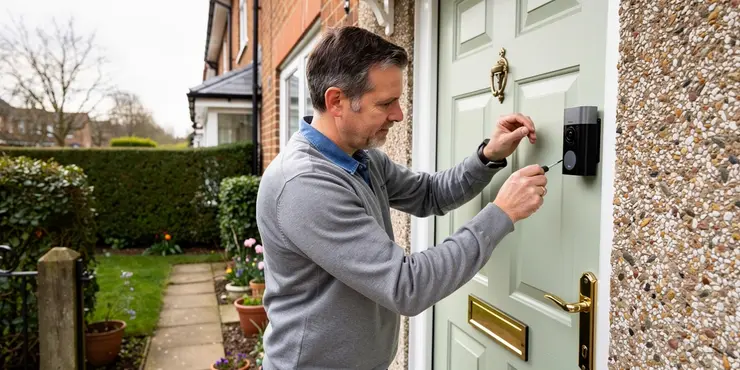
Installing a Ring doorbell camera is relatively straightforward. First, users mount the device near their door using the provided hardware. The device should be positioned in such a way that the camera has a clear view of the area you wish to monitor. Once installed, users connect the device to their home Wi-Fi network via the Ring app. The app guides new users through the setup process, helping them configure motion detection settings and video recording preferences.
Features and Capabilities
Ring doorbell cameras offer a range of features designed to enhance home security. One of the key features is the two-way audio functionality, which allows homeowners to communicate with visitors through the Ring app. This is particularly useful for instructing delivery personnel or deterring unwanted visitors. Additionally, Ring devices offer night vision capabilities, ensuring that your property is monitored even in low-light conditions. Users can also customise motion detection zones to reduce false alerts from passing cars or pedestrians.
Subscription Services
While the basic functionality of a Ring doorbell camera is available without a subscription, users can opt for added services through Ring Protect plans. These subscription services provide cloud storage for video footage, allowing users to review past events and store them for future reference. This is particularly useful for providing evidence in case of incidents or disputes.
Privacy and Security Considerations
Privacy and security are important considerations when using Ring doorbell cameras. To protect against unauthorised access, Ring devices use encryption to secure video and audio data. Additionally, users can enable features such as two-factor authentication and access control to enhance security. It is advisable for users to regularly update their device firmware and app to safeguard against potential vulnerabilities.
Conclusion
Ring doorbell cameras provide an effective solution for enhancing home security in the UK. With features such as motion detection, two-way audio, and night vision, these devices offer peace of mind to homeowners. By understanding their functionality and taking necessary security measures, users can effectively monitor and protect their property.
Introduction to Ring Doorbell Cameras
Ring doorbell cameras are special doorbells with cameras. They help people in the UK keep their homes safe. You can see who is at your door, even when you are not at home. You can talk to visitors and check your home using your phone or computer.
Basic Functionality
Ring doorbell cameras take videos and show them on your phone, tablet, or computer. When someone walks by, the camera starts working. It sends the video over Wi-Fi to the Ring app. You can watch what happens at your door right away.
Installation and Setup
It's easy to set up a Ring doorbell camera. You put it near your door with the tools given. Make sure the camera can see the area you want to check. Connect it to your home Wi-Fi using the Ring app. The app helps you set up how the camera watches for movement and records video.
Features and Capabilities
Ring doorbell cameras have cool features. You can talk to visitors using the Ring app. This helps you tell delivery people what to do or scare away bad people. The cameras can also see at night. You can change settings so you don't get alerts from cars or people walking by.
Subscription Services
You don't need to pay monthly for basic Ring doorbell camera use. But, if you want extra things like saving videos, you can pay for a Ring Protect plan. These plans let you save videos to watch later. This can help if something happens and you need proof.
Privacy and Security Considerations
Keeping your Ring doorbell camera safe is important. It scrambles your videos so others can't see them. You can also add more security by using two-step checks and controlling who sees your videos. Make sure to update the device and app often to keep them safe.
Conclusion
Ring doorbell cameras help keep homes in the UK safe. They have features like motion detection, talking to visitors, and seeing at night. By learning how they work and keeping them secure, you can protect your home well.
Frequently Asked Questions
A Ring Doorbell Camera is a smart home device that allows you to see, hear, and speak to visitors at your door through your smartphone, tablet, or compatible Alexa device.
A Ring Doorbell Camera works by connecting to your home Wi-Fi network and uses a built-in camera, microphone, and speaker to transmit live video and audio to your Ring app.
Yes, a stable Wi-Fi connection is required for a Ring Doorbell Camera to function properly and provide real-time video and notifications.
Yes, basic features like live view and notifications are available without a subscription, but a Ring Protect plan is needed for video recording and storage.
Yes, Ring Doorbell Cameras typically offer video quality ranging from 720p to 1080p HD, depending on the model.
Yes, you can customize motion zones and sensitivity settings to reduce false alerts and focus on areas you want to monitor.
Yes, most Ring Doorbell Cameras are equipped with infrared night vision to provide clear video even in low-light conditions.
Installation typically involves mounting the device near your door, connecting it to Wi-Fi, and setting it up through the Ring app.
Yes, the two-way audio feature allows you to communicate with visitors via the Ring app on your smartphone or tablet.
Yes, the Ring app is essential for device setup, receiving notifications, and accessing live video feeds and other features.
Ring offers a theft protection policy where they will replace your device free of charge if it is stolen, provided that you file a police report.
Battery-powered models use rechargeable batteries for power, allowing for flexible placement without needing existing doorbell wiring.
Yes, Ring Doorbell Cameras are compatible with Alexa, allowing you to receive alerts and view camera feeds on Echo Show devices.
Ring uses encryption and other security measures to protect your video feeds and account information, but users are encouraged to enable two-factor authentication for added security.
Yes, the Ring app allows you to share access with family members or trusted individuals, enabling them to view video feeds and receive alerts.
For battery-powered models, you can remove the battery and recharge it using the provided charging cable, or swap it with a spare battery.
Ring Doorbell Cameras send instant alerts for motion detection and when someone rings the doorbell, allowing you to respond promptly.
No, Ring Doorbell Cameras typically record upon motion detection or doorbell rings. Continuous recording is not supported.
Wired models offer continuous power and may provide additional features, but both types offer similar core functionalities. The choice depends on your setup and preferences.
Yes, wired Ring Doorbell Cameras can be connected to your existing doorbell wiring for constant power.
A Ring Doorbell Camera is a smart gadget for your home. It helps you see, hear, and talk to people at your door. You can do this using your smartphone, tablet, or a device that works with Alexa.
A Ring Doorbell Camera helps you see and hear who is at your door. It connects to your home's Wi-Fi. The camera lets you watch live video, and the microphone and speaker let you hear and talk to people using the Ring app on your phone.
Yes, you need a good Wi-Fi connection for the Ring Doorbell Camera to work well. This helps it show video and send alerts right away.
Yes, some things are free, like live view and notifications. But, to save and watch videos later, you will need to pay for a Ring Protect plan.
Yes, Ring Doorbell Cameras usually show clear video. The pictures can be between 720p and 1080p HD. This depends on which model you have.
Yes, you can change which areas the camera watches. You can also make it more or less sensitive to movement. This helps stop false alarms and lets you keep an eye on the places you care about most.
Yes, most Ring Doorbell Cameras can see in the dark using a special technology called infrared night vision. This helps the camera show clear video even when it's very dark outside.
To set up your device, first put it near your door. Then, connect it to the internet using Wi-Fi. Finally, use the Ring app on your phone or tablet to make it work.
Yes, you can talk to people using the Ring app on your phone or tablet. This helps you chat with visitors who come to your door.
Yes, the Ring app is very important. You need it to set up your device, get alerts, and watch live video. It has other helpful features too.
Ring has a plan to help you. If someone steals your Ring device, they will give you a new one for free. But, you need to tell the police and get a report first.
Here are some tools that can help you:
- Ask a friend or family member for help.
- Use simple words when talking to the police.
These doorbells use batteries that you can charge again and again. You can put them anywhere because they don't need wires to work.
Yes, Ring Doorbell Cameras work with Alexa. You can get alerts and see the camera on Echo Show devices.
Ring keeps your video and account safe using strong security tools. It is a good idea to turn on two-factor authentication. This adds extra safety.
The Ring app lets you share with your family and friends. This means they can watch the video and get alerts too.
If your device uses a battery, you can take it out and charge it with the cable that comes with it. You can also swap it with another battery if you have a spare one.
Ring Doorbell Cameras send a quick alert when they see movement or someone rings the bell. This helps you to answer quickly.
No, Ring Doorbell Cameras do not always record. They start recording when they see something moving or when someone presses the doorbell.
Wired models have power all the time. They might have some extra features. But both wired and wireless models do the same main jobs. Choose the one you like and that works best in your home.
Yes, you can connect a wired Ring Doorbell Camera to your doorbell wires. This gives it power all the time.

Ergsy Search Results
This website offers general information and is not a substitute for professional advice.
Always seek guidance from qualified professionals.
If you have any medical concerns or need urgent help, contact a healthcare professional or emergency services immediately.
Some of this content was generated with AI assistance. We've done our best to keep it accurate, helpful, and human-friendly.
- Ergsy carefully checks the information in the videos we provide here.
- Videos shown by Youtube after a video has completed, have NOT been reviewed by ERGSY.
- To view, click the arrow in centre of video.
- Most of the videos you find here will have subtitles and/or closed captions available.
- You may need to turn these on, and choose your preferred language.
- Go to the video you'd like to watch.
- If closed captions (CC) are available, settings will be visible on the bottom right of the video player.
- To turn on Captions, click settings.
- To turn off Captions, click settings again.