
Get Answers
Introduction to Installing a Ring Doorbell Camera
Installing a Ring Doorbell Camera in the UK is a straightforward process that enhances your home security. This guide will take you through the necessary steps, from gathering the tools to completing the installation, ensuring your device functions correctly.
Tools Required for Installation
Before starting the installation, gather the necessary tools for a smooth process. You will need a drill, a screwdriver, a level, and the screws provided in the Ring Doorbell package. Additionally, ensure you have the Ring app installed on your smartphone for setup and configuration.
Setting Up the Ring Doorbell Camera
Begin by fully charging the Ring Doorbell’s battery. Use the USB cable included in the package to connect the device to a power source. Once charged, download the Ring app from the Apple App Store or Google Play Store and create an account. Follow the on-screen instructions to set up your Ring Doorbell on the app, connecting it to your Wi-Fi network.
Choosing the Right Location
Position your Ring Doorbell at an optimum height, typically around 1.2 meters above the ground. This placement allows for the best field of view for capturing visitors' faces. Ensure there is a strong Wi-Fi signal at your chosen location to guarantee a seamless connection.
Installation Process
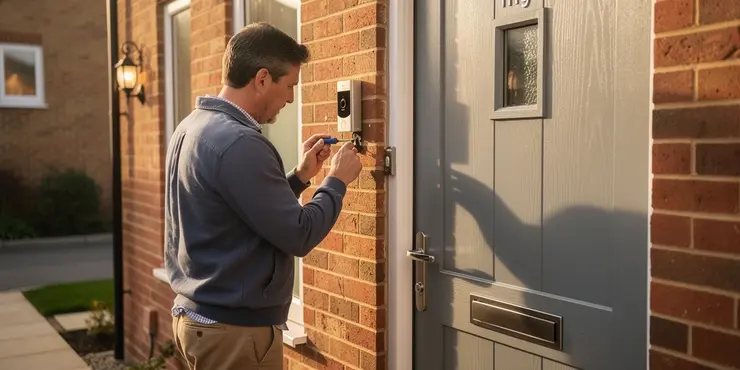
With your location selected, mark the holes for drilling using the base plate as a guide. Drill holes into your wall or door frame using a suitable drill bit, particularly if installing on brick or concrete. Insert the wall plugs into the holes for a sturdy fixture. Now, attach the base plate with the screws provided. Ensure it’s level for a neat installation.
Next, hook the Ring Doorbell onto the base plate and secure it with the included security screws at the bottom. Make sure the device is firmly attached to avoid any dislodging or theft.
Final Setup and Testing
Once installed, return to the Ring app to test the doorbell's functionality. Press the button to ensure it activates the chime on your phone. Use the app to view the live video feed and check audio clarity. Adjust settings such as motion detection zones to suit your preferences and enhance security.
Conclusion
By following these steps, you can successfully install a Ring Doorbell Camera, providing enhanced security and convenience for your home. Ensure the device is regularly updated via the app for optimal performance. With this setup, you can confidently monitor your home from anywhere using your smartphone.
Introduction to Installing a Ring Doorbell Camera
Putting in a Ring Doorbell Camera in the UK is easy. It helps keep your home safe. This guide will show you how to do it step by step. You will learn what tools you need and how to set it up so it works well.
Tools Required for Installation
Before you start, get all the tools you will need. You need a drill, a screwdriver, a level, and the screws that come with the Ring Doorbell. Also, have the Ring app ready on your smartphone to help set it up.
Setting Up the Ring Doorbell Camera
First, charge the Ring Doorbell’s battery. Use the USB cable included to plug it into power. While it charges, download the Ring app from the Apple App Store or Google Play Store. Open the app to make an account. Follow the steps on the screen to set up your Ring Doorbell and connect it to your home Wi-Fi.
Choosing the Right Location
Put your Ring Doorbell about 1.2 meters from the ground. This height helps see people’s faces clearly. Make sure the Wi-Fi signal is strong where you put it so it works well.
Installation Process
Once you decide where to put it, mark where you need to drill holes using the base plate. Use a drill to make holes in the wall or door frame. If the wall is brick or concrete, use the right drill bit. Put wall plugs into the holes to hold it tight. Then, screw on the base plate. Make sure it's straight.
After that, hook the Ring Doorbell onto the base plate. Tighten it with the security screws at the bottom. Make sure it’s on tight so it stays safe.
Final Setup and Testing
When the installation is done, go back to the Ring app. Press the doorbell button to make sure it rings on your phone. Check the video and sound through the app. You can set motion detection zones to watch certain areas more closely.
Conclusion
By following these steps, you can install a Ring Doorbell Camera. It will keep your home safe and make things easier. Keep the device updated through the app for the best performance. Now, you can watch your home from anywhere using your smartphone.
Frequently Asked Questions
You will need a screwdriver, a drill, and the installation kit provided with the Ring Doorbell, which includes screws, anchors, and a level.
If you are connecting it to existing doorbell wiring, it's recommended to turn off the power at the breaker to ensure safety.
Yes, you can install it without existing wiring by using the Ring's rechargeable battery option.
The recommended installation height is about 48 inches above the ground.
First, download the Ring app on your smartphone and create an account or log in.
Use the Ring app to connect your device to your home Wi-Fi network by following the on-screen instructions.
A subscription is not required for basic functionality, but a Ring Protect Plan is needed for saving and reviewing recorded footage.
Use the included screws and anchors to secure the mounting bracket to the wall at the desired height and location.
Remove the battery from the device and use the included USB cable to charge it. Reinsert it once fully charged.
Ensure the battery is charged and properly installed. Check your wiring and connections if it's wired.
The Ring app will confirm a successful connection, and you should be able to access the live view feature.
It includes motion detection, video recording, two-way audio, and night vision capabilities.
Make sure it's placed in an area with a strong Wi-Fi signal and adjust settings in the app for optimal performance.
Yes, it can be installed on brick, concrete, wood, and siding surfaces with appropriate tools.
Use the included security screws to mount it securely and enable the app's security notifications.
Use the Ring app to adjust the zones and sensitivity settings for motion detection.
Yes, professional installation services are available through Ring or third-party providers.
Yes, it can be integrated with smart home systems like Amazon Alexa for added convenience.
Use the Ring app to invite family members by sending an invite via their email addresses.
Check your Wi-Fi connection, restart the device, and ensure there are no obstructions in front of the camera lens.
You need a few tools:
- A screwdriver
- A drill
- The kit that comes with the Ring Doorbell. This kit has screws, anchors, and a level.
If you want to use the wires already there for your doorbell, make sure you switch off the power at the main switch to stay safe.
Yes, you can set it up even if you don't have wires. You can use the Ring's battery that you can charge again and again.
The best height to put it is about 48 inches above the ground. That's like the height of a tall chair.
First, get the Ring app on your phone. Make an account or log in if you already have one.
Use the Ring app to connect your device to your home Wi-Fi. Just follow the steps you see on the screen.
You don't need to pay money to use the basic features. But if you want to save and watch old videos, you need to buy a Ring Protect Plan.
Use the screws and anchors that come with it to fix the bracket to the wall where you want it.
Take the battery out of the device. Use the USB cable in the box to charge the battery. Put the battery back in when it is fully charged.
Make sure the battery has power and is put in the right way. If it's connected with wires, check the wires and plugs to see if they are okay.
The Ring app will let you know when it is connected. You can then see what is happening in real-time.
This camera can do a lot of things. It can see when something moves. It can record videos. You can talk and listen with it, like a phone. It can also see in the dark.
Put it somewhere with good Wi-Fi, so it works well. Change settings in the app to make it work best.
Yes, you can put it on brick, concrete, wood, and siding. You just need the right tools.
Use the special screws in the box to hold it safely. Turn on the app to get safety alerts.
Open the Ring app. You can change the areas and how sensitive the motion sensor is to movement.
Yes, you can have a professional help you set up your Ring. You can get help from Ring or other companies.
Yes, you can use it with smart home systems like Amazon Alexa. This makes it easier to use.
To ask your family to join, open the Ring app. Send them an invite using their email. This will help them get started with the Ring app too!
Make sure your Wi-Fi is working. Turn your device off and on again. Also, check that nothing is blocking the camera lens.

Ergsy Search Results
This website offers general information and is not a substitute for professional advice.
Always seek guidance from qualified professionals.
If you have any medical concerns or need urgent help, contact a healthcare professional or emergency services immediately.
Some of this content was generated with AI assistance. We've done our best to keep it accurate, helpful, and human-friendly.
- Ergsy carefully checks the information in the videos we provide here.
- Videos shown by Youtube after a video has completed, have NOT been reviewed by ERGSY.
- To view, click the arrow in centre of video.
- Most of the videos you find here will have subtitles and/or closed captions available.
- You may need to turn these on, and choose your preferred language.
- Go to the video you'd like to watch.
- If closed captions (CC) are available, settings will be visible on the bottom right of the video player.
- To turn on Captions, click settings.
- To turn off Captions, click settings again.