
Get Answers
What a virtual ward is
A virtual ward lets you receive hospital-level monitoring and support at home. It is used by NHS teams to keep an eye on your condition without you needing to stay in a physical ward.
How it works depends on your illness, but it often includes regular check-ins, symptom updates, and remote monitoring. The aim is to help you recover safely while staying in familiar surroundings.
What equipment you may need
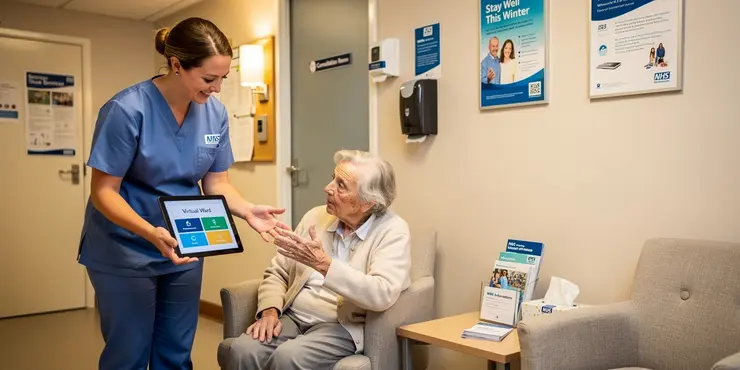
In many cases, you do not need anything special to join a virtual ward. The NHS team may provide the equipment you need, such as a blood pressure monitor, pulse oximeter, thermometer, or tablet device.
Some virtual wards only need you to use your own phone to answer calls or send updates. Others may involve app-based monitoring, where you enter readings or symptoms each day.
Using your own equipment
You may be asked to use your own smartphone, tablet, or internet connection if the service is designed that way. This is more common when the virtual ward uses an app or digital messaging system.
If you do not have suitable equipment, let the team know. NHS services are expected to consider access needs and may offer alternatives so you are not left out.
What the NHS usually provides
Many virtual ward patients are given devices to use at home. These are often simple to use and come with instructions, either on paper or through a member of the team.
Some services also provide batteries, charging cables, or return packaging for the equipment. If you are unsure how anything works, you should ask for a demonstration before you start.
Access and support for patients
You do not need to be confident with technology to take part in a virtual ward. Staff can often support you by phone and explain how to use any devices step by step.
If you have sight, hearing, mobility, or language needs, tell the team early. They may be able to adjust the setup, provide accessible formats, or involve a carer or family member with your permission.
Checking before you join
Before you start, ask the virtual ward team what equipment is needed and who will supply it. It is also worth checking whether you need Wi-Fi, mobile signal, or a charged phone to take part.
If you are worried about cost, access, or storage space, mention this before discharge or referral. The team should help you understand exactly what is needed so you can take part safely and comfortably.
Frequently Asked Questions
Virtual ward special equipment is medical or monitoring equipment used at home or in another non-hospital setting to support patients who would otherwise need inpatient care. It can include remote monitoring devices, oxygen equipment, blood pressure cuffs, pulse oximeters, tablets, and other tools that help clinicians track a patient's condition safely.
Eligibility for virtual ward special equipment depends on the patient's condition, clinical risk, ability to use the equipment safely, and whether remote monitoring is appropriate. A clinician or virtual ward team usually decides based on medical need, support at home, and the goals of care.
Common virtual ward special equipment includes pulse oximeters, blood pressure monitors, thermometers, scales, glucose meters, symptom-tracking devices, oxygen therapy equipment, and communication devices such as tablets or phones for virtual check-ins. The exact equipment depends on the patient's diagnosis and monitoring needs.
Virtual ward special equipment is usually delivered by the hospital, community team, or approved supplier. The patient may receive it in person, by courier, or during discharge planning, along with instructions for safe use and contact details for support.
Virtual ward special equipment is typically set up by a nurse, clinician, technician, or trained support staff. Setup may include showing the patient how to use the device, testing connectivity, confirming readings are transmitted correctly, and checking that the equipment is placed safely in the home.
Virtual ward special equipment is monitored through regular data review, alerts, and scheduled check-ins. Readings from devices such as pulse oximeters or blood pressure monitors may be sent to a clinical dashboard, where staff watch for concerning changes and contact the patient if needed.
Safety checks for virtual ward special equipment include confirming correct use, checking battery levels, verifying that readings are accurate, ensuring infection control, and making sure the equipment is suitable for the patient's home environment. Patients should report faults, unusual readings, or difficulty using the devices.
If virtual ward special equipment stops working, the patient should contact the virtual ward team or equipment support line right away. The team may troubleshoot the issue, replace the device, or arrange an alternative way to monitor the patient until the equipment is repaired or exchanged.
Yes, virtual ward special equipment can often be used by family members or carers if they are trained and agree to help. They may assist with taking readings, charging devices, and reporting results, but the clinical team should know who is responsible for using the equipment.
Virtual ward special equipment should be cleaned and maintained according to the instructions provided by the clinical team or manufacturer. This often includes wiping surfaces with approved disinfectant, keeping devices dry, charging batteries, and avoiding damage or tampering with sensors and cables.
Coverage for virtual ward special equipment depends on the local health service, hospital policy, or insurance plan. In many programs, the equipment is provided as part of care, but patients should confirm any costs, replacement fees, or responsibilities before discharge.
A patient can usually keep virtual ward special equipment for as long as the virtual ward team considers it clinically necessary. Once monitoring is no longer needed, the team will arrange collection, return, or disposal according to the program's procedures.
Training for virtual ward special equipment usually includes how to turn the device on, take readings, record results, troubleshoot basic problems, and know when to seek help. Some programs also provide written guides, videos, or phone support for reinforcement.
Virtual ward special equipment protects patient privacy by using secure data transmission, restricted access to clinical dashboards, and approved devices or apps. Patients should use the equipment only as instructed, keep login details private, and ask the team how their information is stored and shared.
Yes, virtual ward special equipment can be used for children or older adults if it is appropriate for their condition and they have the support needed to use it safely. Clinicians may adjust the type of equipment, instructions, and monitoring frequency based on age and ability.
After discharge from the virtual ward, the equipment is usually returned, collected, or deactivated depending on the program. The team may also review the patient's condition, provide follow-up advice, and explain whether any ongoing home monitoring is needed.
Yes, some virtual ward special equipment can trigger alerts when readings fall outside set thresholds or when a patient misses measurements. These alerts help clinicians respond early, but patients should still seek urgent help immediately if they have severe or sudden symptoms.
If virtual ward special equipment gives an unexpected reading, the patient should repeat the measurement if instructed and contact the virtual ward team for advice. The team may ask about symptoms, check device use, or arrange further assessment if the reading appears concerning.
Most virtual ward special equipment requires only a small, clean, and safe space at home. Some items may need access to a power socket, a table or bedside surface, or a stable internet or mobile signal for data transmission.
A patient can usually request virtual ward special equipment through their hospital team, GP, specialist, or community service if they think home monitoring may help. A clinician will assess whether the equipment is clinically appropriate and arrange it if the patient meets the criteria.

Ergsy Search Results
This website offers general information and is not a substitute for professional advice.
Always seek guidance from qualified professionals.
If you have any medical concerns or need urgent help, contact a healthcare professional or emergency services immediately.
Some of this content was generated with AI assistance. We've done our best to keep it accurate, helpful, and human-friendly.
- Ergsy carefully checks the information in the videos we provide here.
- Videos shown by Youtube after a video has completed, have NOT been reviewed by ERGSY.
- To view, click the arrow in centre of video.
- Most of the videos you find here will have subtitles and/or closed captions available.
- You may need to turn these on, and choose your preferred language.
- Go to the video you'd like to watch.
- If closed captions (CC) are available, settings will be visible on the bottom right of the video player.
- To turn on Captions, click settings.
- To turn off Captions, click settings again.