
Get Answers
Introduction
The Ring Doorbell Camera is a popular smart home device that allows users to see, hear, and speak to visitors at their door through their smartphone or tablet. One common question among UK homeowners is whether it can be used with existing doorbell wires. In this article, we will explore how you can integrate a Ring Doorbell Camera with your current doorbell setup.
Compatibility with Existing Doorbell Wires
Most UK homes are equipped with traditional doorbells that use low-voltage wiring. The good news is that many Ring Doorbell models are designed to work with these existing wires. Generally, Ring Doorbells can be connected to any doorbell system that provides between 8-24 volts AC. This is typical for most UK doorbell systems, but it is essential to verify your current setup before beginning installation.
Benefits of Using Existing Wires
By connecting your Ring Doorbell Camera to existing doorbell wires, you can eliminate the need for frequent battery charging. The wired connection ensures continuous power supply to the device, enhancing convenience and ensuring that your camera remains operational at all times. Additionally, it allows the use of your existing mechanical chime, if compatible, which can ring when the doorbell button is pressed.
Installation Process
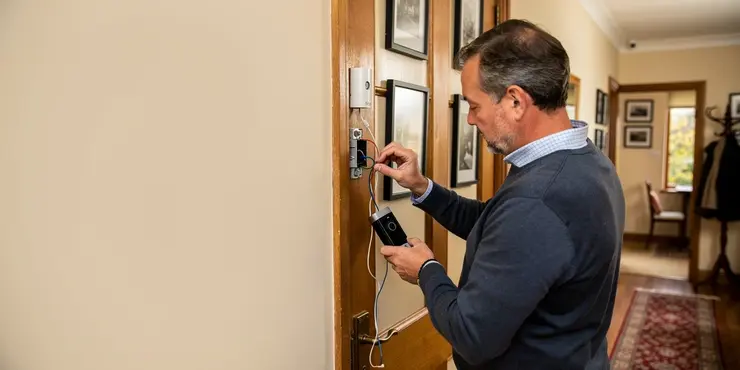
Installing a Ring Doorbell Camera using existing wires involves a few straightforward steps. First, turn off power to your existing doorbell system to ensure safety during the installation process. Next, remove the old doorbell and connect the wires to the terminals on the back of the Ring Doorbell. Secure the device to your wall using the mounting equipment provided. Once the Ring Doorbell is installed, restore power to your doorbell system and proceed with the setup via the Ring app.
Potential Challenges
While installation is generally simple, some challenges might arise. Ensure that the voltage of your existing system falls within the acceptable range specified by Ring. Additionally, check that the wiring is in good condition and can support the new device. Older homes may have incompatible wiring or systems that require additional transformers or resistors to work with the Ring Doorbell. In such cases, consulting a professional electrician can help overcome these issues.
Conclusion
Using a Ring Doorbell Camera with your existing doorbell wires is a practical and beneficial enhancement for your home security system. It ensures continuous operation and integrates the new technology with the convenience of your existing setup. However, always ensure compatibility by checking voltage requirements and wiring conditions. For those uncertain about installation, seeking professional assistance is advisable to ensure safety and functionality.
Introduction
The Ring Doorbell Camera is a special device for your home. It lets you see, hear, and talk to people at your door using a smartphone or tablet. Many people in the UK wonder if they can use it with their current doorbell wires. This guide will show you how to connect a Ring Doorbell Camera to your existing doorbell setup.
Using Current Doorbell Wires
Most homes in the UK have doorbells with low-voltage wires. The good news is many Ring Doorbells can work with these wires. Ring Doorbells usually fit any system with 8-24 volts AC power. This is normal for most UK doorbells, but you should check your system before starting.
Why Use Current Wires?
Hooking up your Ring Doorbell to existing wires can save you from charging batteries often. The wires keep the camera powered all the time. This makes it convenient and ensures your camera is always on. If your bell fits, it might even ring when someone presses the doorbell button.
How to Install
Setting up a Ring Doorbell using your wires is pretty simple. First, turn off the power to your doorbell to stay safe. Next, take off the old doorbell and attach the wires to the Ring Doorbell. Mount it on the wall using the tools in the box. After that, turn the power back on and use the Ring app to finish the setup.
Things to Watch Out For
Most setups are easy, but there can be issues. Make sure your system's voltage matches what Ring needs. Also, check your wires to see if they are in good shape for the new device. Older homes may have wires or systems that need extra parts like transformers. If this is tough for you, an electrician can help fix these problems.
Conclusion
Using a Ring Doorbell Camera with your doorbell wires is smart for better home security. It keeps working all the time and fits with your current setup. Always check if things match by looking at voltage and wire conditions. If you're not sure how to install, asking a professional for help is a good idea for safety and to make sure it works right.
Frequently Asked Questions
Yes, many Ring Doorbell camera models can use existing doorbell wires for power, provided the wiring meets the device's voltage requirements and is in good condition.
Most Ring Doorbell cameras that use existing doorbell wires require low-voltage AC power, typically around 8 to 24 VAC, but you should always check the specific model requirements.
Check the label on your transformer or test the voltage with a multimeter. Compare the result with the installation guide for your specific Ring Doorbell camera model.
Yes, it is safest to turn off power to the doorbell circuit at the breaker before working with existing wires during installation.
Yes, the existing doorbell wires are usually powered by a transformer, and the transformer must supply the correct low-voltage power for the Ring Doorbell camera to function properly.
Some Ring Doorbell cameras with a battery can receive a trickle charge from existing doorbell wires, but the wires may not fully charge the battery depending on the model and usage.
If the existing doorbell wires have no power, the Ring Doorbell camera may run on battery if supported, but wired features like continuous power may not work.
In many cases, yes, but some models require a Ring Chime Pro, app configuration, or a bypass kit depending on your wiring and chime type.
Some setups may require a power kit, resistor, or bypass component to ensure proper operation and to prevent chime issues. Follow the instructions for your exact model.
Common causes include insufficient voltage, loose wire connections, a faulty transformer, or wiring that is not delivering power to the doorbell terminals.
Yes, but digital chimes often need specific configuration or a compatible power kit to avoid buzzing, chime failure, or missed rings.
Professional help is not always required, but it can be useful if you are unsure about electrical wiring, transformer voltage, or chime compatibility.
Typically, you attach the two existing low-voltage wires to the screw terminals on the back of the Ring Doorbell camera, then tighten them securely.
Yes, many Ring Doorbell cameras can still use existing doorbell wires for power even if there is no indoor chime, as long as the transformer and wiring provide proper voltage.
Most standard low-voltage doorbell wire gauges work fine, as long as the wire is in good condition and can deliver the required power over the distance.
Yes, if wires are damaged, crossed, or improperly connected, a short circuit can occur. Turn off power before installation and inspect the wiring carefully.
Use a multimeter to measure the voltage across the doorbell wires and confirm that it falls within the supported range for your Ring Doorbell camera model.
If the doorbell wiring depends on household power, the Ring Doorbell camera will not receive wired power during an outage unless it has a charged battery backup.
Yes, if the new location has compatible low-voltage wiring or if you can extend the existing wiring safely and within the device's power requirements.
A buzzing chime usually indicates a compatibility or power issue. Check the wiring connections, verify transformer voltage, and install any required power kit or bypass component.

Ergsy Search Results
This website offers general information and is not a substitute for professional advice.
Always seek guidance from qualified professionals.
If you have any medical concerns or need urgent help, contact a healthcare professional or emergency services immediately.
Some of this content was generated with AI assistance. We've done our best to keep it accurate, helpful, and human-friendly.
- Ergsy carefully checks the information in the videos we provide here.
- Videos shown by Youtube after a video has completed, have NOT been reviewed by ERGSY.
- To view, click the arrow in centre of video.
- Most of the videos you find here will have subtitles and/or closed captions available.
- You may need to turn these on, and choose your preferred language.
- Go to the video you'd like to watch.
- If closed captions (CC) are available, settings will be visible on the bottom right of the video player.
- To turn on Captions, click settings.
- To turn off Captions, click settings again.