
Get Answers
Understanding Teleconsultations with EU Doctors
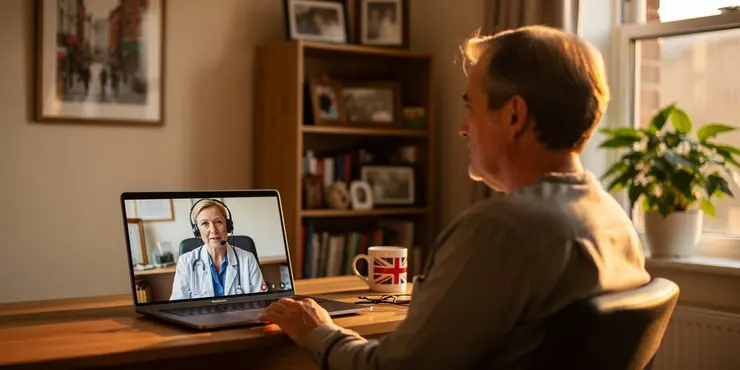
Teleconsultations have become a prevalent way to access healthcare in recent years. For UK residents, consulting with EU-based doctors before traveling is an appealing option. It offers convenience and access to specialist medical advice without leaving home.
Before diving into telehealth services with EU practitioners, it's essential to understand how this process works. It leverages digital platforms to facilitate communication between patients and doctors remotely.
Accessing Teleconsultations from the UK
To access teleconsultations with EU doctors, the first step is finding a suitable platform. Many online services now connect patients with healthcare professionals across Europe. These platforms often require an account setup and basic personal information.
Once the account is set up, selecting a doctor based on specialty and language preferences is usually the next step. Many platforms provide profiles detailing the doctors' qualifications and areas of expertise, helping patients make informed choices.
Benefits of Teleconsultations with EU Doctors
One major advantage is the breadth of medical expertise available. EU doctors might offer insights or treatments not commonly found in the UK. This can be particularly beneficial for rare conditions or less common illnesses.
Furthermore, time and cost savings are significant. Patients can often secure appointments faster than traditional in-person visits. This can be crucial when planning travel and needing timely medical advice.
Considerations and Regulations
While convenient, there are important considerations when engaging in teleconsultations with EU doctors. Ensuring the credibility of the service provider and the practitioner is vital. Look for platforms that comply with medical regulations in both the UK and the EU.
Data privacy should also be a priority. Understand how your personal and medical information will be used and stored. Reputable platforms will have clear privacy policies aligning with GDPR guidelines.
Preparing for Your Teleconsultation
Before the appointment, gather any medical records or history that might be relevant. This helps the doctor provide a comprehensive and informed consultation.
Technical preparation is also key. Ensuring a stable internet connection and a suitable device will facilitate a smooth consultation process. Test your equipment beforehand to avoid any technical issues during your appointment.
Conclusion
Teleconsultations with EU doctors can be a valuable resource for UK travelers. They provide access to a broad range of expertise and can enhance travel preparedness through timely health assessments.
While the benefits are clear, due diligence in selecting the right platform and practitioner is essential. By doing so, patients can confidently seek medical advice from across the EU, enhancing their healthcare experience.
Frequently Asked Questions
Yes, many healthcare providers offer teleconsultations with EU doctors for patients before they travel.
Teleconsultations can provide medical advice, ensure you have necessary prescriptions, and prepare you for any ongoing treatment during your travel.
Coverage varies by insurance provider. Check with your insurance company to determine if teleconsultations are covered.
You can book a teleconsultation through a healthcare provider or an online telehealth platform that offers such services.
You need a device with internet access, a webcam, and a microphone, such as a smartphone, tablet, or computer.
A typical teleconsultation lasts about 15 to 30 minutes, depending on the patient's needs and the doctor's advice.
Most telehealth services offer consultations in several European languages, including English, French, German, Spanish, and more.
Yes, if the doctor deems it necessary, they can send a prescription to a pharmacy for you to obtain the medication.
Yes, telehealth platforms are required to comply with data protection laws, ensuring your medical information remains confidential.
In case of an emergency, it is advised to contact local emergency services immediately rather than relying on teleconsultation.
Some platforms allow you to choose a specific doctor, while others match you based on your medical needs and availability.
Referral requirements vary. Some telehealth services do not require referrals, but it's best to check specific service requirements.
Availability varies by service. Some platforms offer 24/7 access, while others have limited hours.
Prepare your medical history, list of symptoms, any current medications, and questions you may want to ask the doctor.
Yes, many telehealth providers offer consultation with specialists across various medical fields.
Some consultations may include follow-up care or recommendations for further treatment, as determined by the doctor.
Teleconsultations are suitable for many conditions, but severe or complex cases might require in-person visits.
Costs vary, but teleconsultations often cost less than in-person visits due to reduced overhead costs.
Yes, teleconsultations can be a great way to obtain a second opinion on a medical diagnosis or treatment plan.
Recording policies vary; some services may record sessions for quality and training purposes, but patient consent is typically required.

Ergsy Search Results
This website offers general information and is not a substitute for professional advice.
Always seek guidance from qualified professionals.
If you have any medical concerns or need urgent help, contact a healthcare professional or emergency services immediately.
Some of this content was generated with AI assistance. We've done our best to keep it accurate, helpful, and human-friendly.
- Ergsy carefully checks the information in the videos we provide here.
- Videos shown by Youtube after a video has completed, have NOT been reviewed by ERGSY.
- To view, click the arrow in centre of video.
- Most of the videos you find here will have subtitles and/or closed captions available.
- You may need to turn these on, and choose your preferred language.
- Go to the video you'd like to watch.
- If closed captions (CC) are available, settings will be visible on the bottom right of the video player.
- To turn on Captions, click settings.
- To turn off Captions, click settings again.